
What is this article about?
In this article, we explain and compare the main levels of IT support, how support tiers differ, and how a well-designed support structure helps companies resolve issues faster, reduce downtime, and assign the right technical ownership to complex problems.
Modern business systems now run across multiple distributed components: cloud infrastructure, SaaS tools, mobile apps, APIs, databases, and connected devices.
The scale explains why support has become harder:
- Cloud infrastructure spending reached $399.6 billion in 2025.
- Large enterprises manage around 660 SaaS applications on average.
- The mobile ecosystem already includes 14.35 billion connections, including IoT devices and sensors.
When something breaks, the visible issue may seem simple, but the real cause can lie deep within integrations, middleware, permissions, infrastructure, data flows, or application logic.
That is why technical support works best as a structured service model rather than a single “fix everything” function. Each IT support level has a clear role: first-response troubleshooting, deeper technical diagnostics, or engineering-level investigation.
That complexity is expensive to cover fully in-house. Instead of trying to organize an IT department with every support tier internally, companies can work with an IT service provider and get access to help desk, DevOps, cloud, and engineering-level support when they need it. This article explains how IT support tiers work, so you can better understand what level of service your business needs and what to look for when hiring a provider.
Key takeaways:
- Tiered support addresses the modern complexity. With hybrid systems involving cloud, SaaS, and mobile, a multi-layered support model ensures the right technical experts handle each unique problem.
- The support structure ranges from self-service to senior software engineering. The hierarchy moves from Tier 0 automation and FAQs to Tier 3, where senior engineers tackle code defects and complex root-cause analysis.
- A clear tier system cuts costly downtime. By routing issues correctly and quickly, structured support minimizes major disruptions and the significant financial impact of unplanned outages.
- Adopt an engineering mindset to improve system health. Shift from simply closing tickets to tracking recurring problems, turning incident data into insights that proactively stabilize your product.
What is technical support?
Technical support is a structured service that helps users, employees, or customers solve issues with software, hardware, infrastructure, or connected services. The support model can cover internal workplace tools, customer-facing products, vendor platforms, and live production systems.
This matters because even short disruptions are expensive. A 2026 Cisco Splunk report found that unplanned downtime costs Global 2000 companies around $600 billion per year, with an average impact of $15,000 per minute.
In practice, technical support usually includes:
- Production support for apps, databases, cloud resources, and integrations
- User requests and access issues
- Software and hardware troubleshooting
- Monitoring and incident response
- Updates, patches, and configuration support
- Vendor software support and long-term maintenance.
Most companies organize this work into levels of IT support, where higher tiers mean deeper technician qualifications and more complex support operations.
Each IT support level handles a different depth of work, from common user requests to deeper diagnostics and engineering-level fixes.
Why does your business need technical support?
The thinking behind technical support has been changing for some time. The old “respond, close, repeat” routine treats support as an endless queue of separate errors: answer the ticket today, close it, then face the same type of issue again tomorrow.
A stronger engineering approach looks at the health of the whole system. Support teams track recurring incidents, weak workflows, unstable integrations, unclear permissions, and infrastructure signals, then use that evidence to reduce repeat failures.
Healthy systems create fewer tickets, fewer escalations, and fewer frustrated users.
Customer-facing support directly affects retention: Conviva’s report found that 91% of consumers faced frustrating digital issues, and more than half abandoned purchases, canceled subscriptions, or switched brands.
Modern systems often run across cloud environments, SaaS tools, mobile apps, APIs, databases, AI agents, and third-party integrations. This includes FinTech, EdTech, retail platforms, and other digital products where a slow dashboard may indicate a database query issue. A failed login may be due to identity settings, permissions, or an API issue. This complexity requires a structured support system with clear ownership, response rules, escalation paths, and measurable service goals.
In practice, technical support usually covers:
- Internal IT support for devices, access rights, workplace tools, and business software
- Customer-facing support for SaaS products, mobile apps, platforms, and digital services
- Production support for infrastructure, databases, APIs, cloud resources, monitoring, and releases
That is why companies separate support work into IT support levels based on complexity, access level, and required technical depth.
Different issues require different technical knowledge, so companies organize work through IT support tiers. A help desk team can handle common user requests, basic troubleshooting, and configuration checks, while Tier 1 and Tier 2 teams take on deeper diagnostics. Tier 2 and Tier 3 advanced technical support specialists then step in for infrastructure issues, code-level defects, performance bottlenecks, root cause analysis, and recurring incidents.
A tiered support model also makes automation more effective. AI agents can classify support tickets, suggest answers from a knowledge base, summarize logs, detect repeated incident patterns, and help reduce resolution time. These tools bring the best results when escalation rules, ticket data, and documentation are already clean.
The real value of IT support levels lies in control. Each issue gets the right priority, the right specialist, and a clear path to resolution. Over time, recurring problems become product insights rather than repeated interruptions.

“Good technical support should not stop at fixing the issue that appeared today. The real value comes when the team asks why it happened in the first place.
Was something unclear for users? Was one part of the system overloaded? Was an important warning missed? When support teams notice these patterns, document incidents properly, and describe problems clearly, they help higher-level engineers resolve issues faster.
Over time, this means fewer repeat problems, less pressure on developers, and a better experience for customers.”
Nazar Hazdun
CTO at Geniusee
IT support levels and tiers explained
In this section, we’ll explain and compare the main support levels, from self-service and frontline help desk to deeper diagnostics and engineering-level support. The goal is to show what each tier handles, when escalation makes sense, and how a tiered structure helps teams resolve issues faster.
Understanding IT support tiers
A good support structure does more than move requests from one inbox to another. An efficient tiered support system separates issues by complexity, required access, and the technical knowledge needed to solve them. That is the main idea behind the different IT support levels.
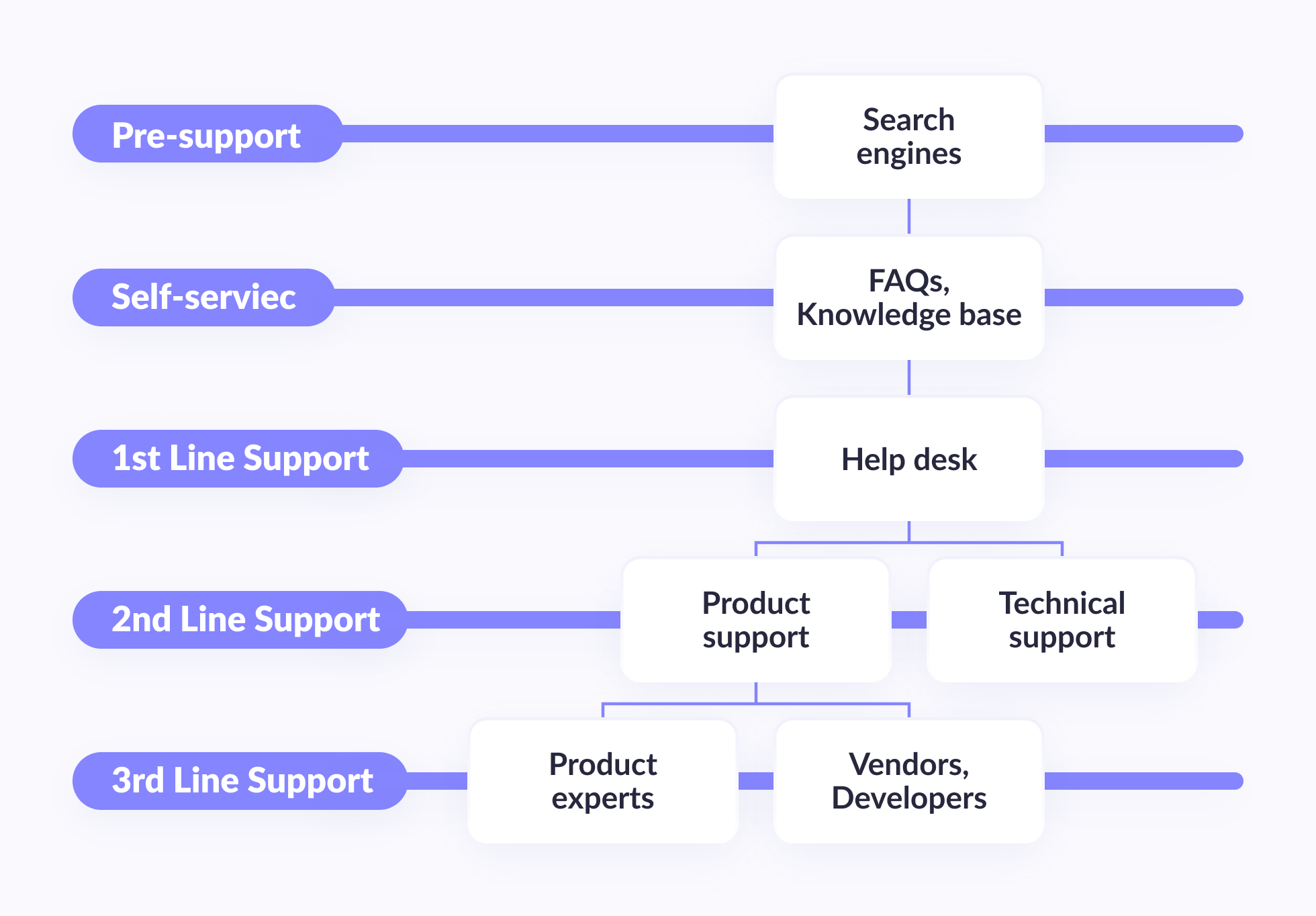
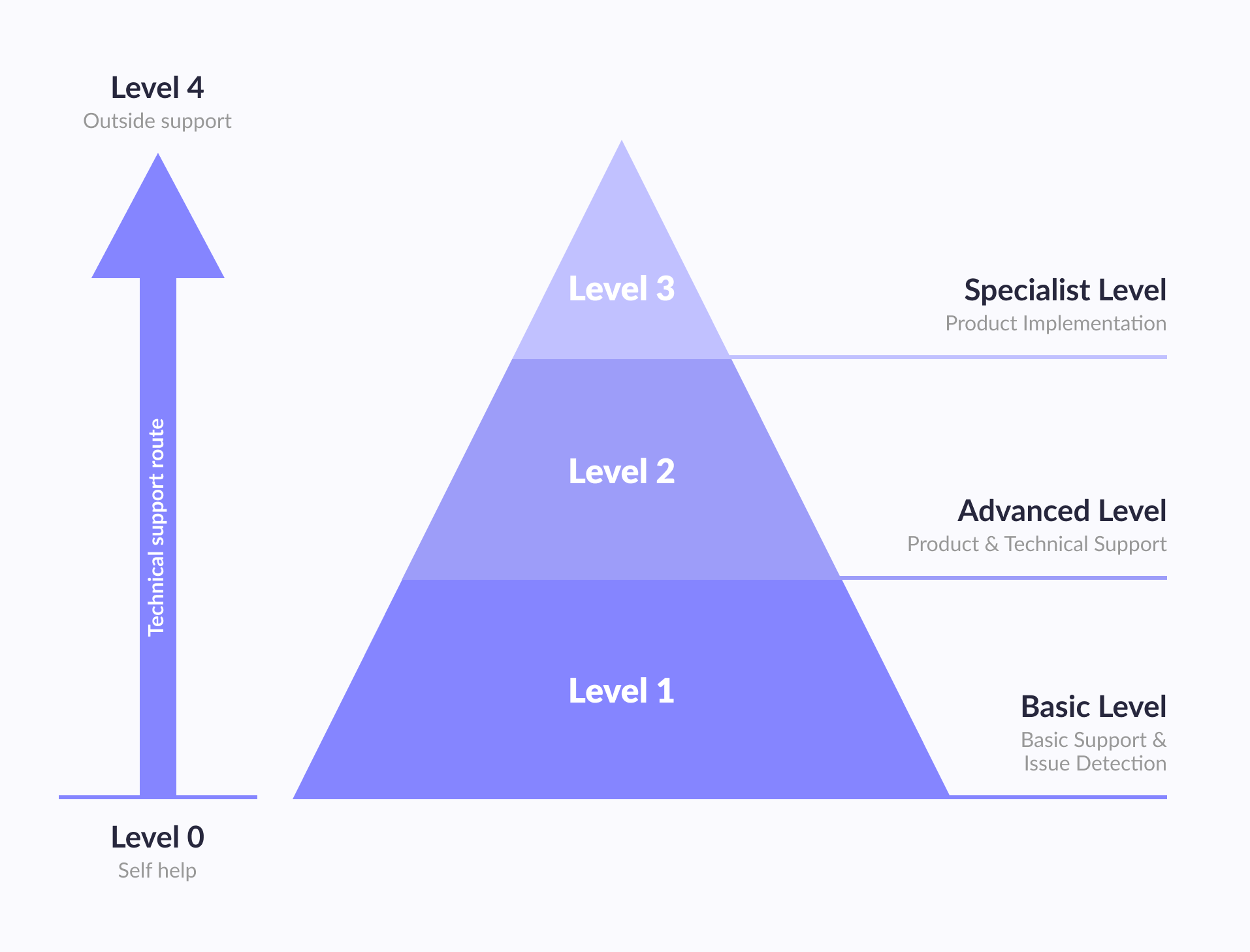
In most companies, the support path runs from Tier 0 to Tier 3, sometimes with an additional Tier 4 for product improvements or vendor-side engineering. This structure helps teams handle basic support quickly, route complex incidents to qualified specialists, and keep senior engineers focused on the problems that truly require their attention.
What each tier handles
Different IT support tiers exist because not every request needs the same level of expertise. A password reset, a failed login, a database issue, and a code-level defect should never follow the same route.
An effective tier structure usually includes 3 help desk support tiers:
- Tier 0 support for self-service resources, chatbots, FAQs, AI agents, and knowledge base articles
- Tier 1 support (frontline support) for user requests, first-response troubleshooting, access issues, and basic configuration help
- Tier 2 IT support for deeper diagnostics, system checks, cloud issues, and problems that tier 1 technicians can’t resolve
- Tier 3 IT support for complex application defects, infrastructure failures, performance bottlenecks, vulnerabilities, and root cause analysis
Tier 0 support
Tier 0 support gives users a way to solve simple issues without contacting a specialist. This layer may include a help center, an AI chatbot, automated workflows, troubleshooting guides, product documentation, and a searchable knowledge base.
This tier handles repetitive questions and predictable requests, such as “How do I reset my password?”, “Where can I find this setting?”, or “Why can’t I access this feature?” When tier 0 works well, users get answers faster, while support teams receive fewer low-complexity tickets.
Level 1 support
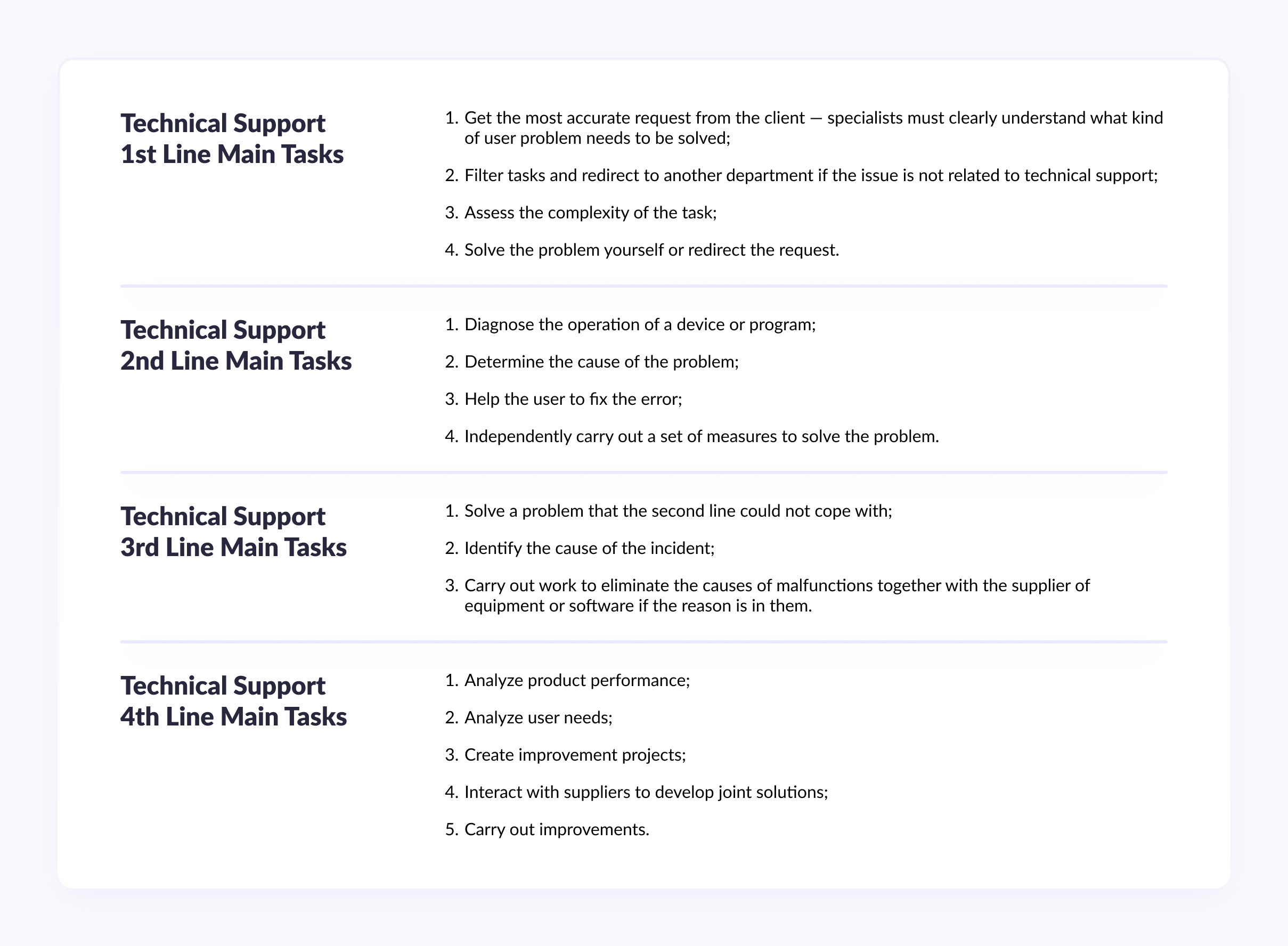
Level 1 support is the first human response layer. Tier 1 agents collect the user’s request, clarify the issue, check standard scenarios, and determine whether the problem can be resolved immediately or requires escalation.
Typical Level 1 tasks include:
- Registering and classifying support tickets
- Checking account access, device settings, and basic software behavior
- Guiding users through known fixes
- Redirecting non-technical or misrouted requests
- Escalating unresolved issues to the right specialist
The difference between Tier 1 vs Tier 2 is mostly depth. Tier 1 focuses on known issues and first-line troubleshooting, while Tier 2 investigates less obvious technical causes.
Level 2 support
Level 2 support works with problems that require deeper technical access and stronger product knowledge that Tier 1 can’t provide. These specialists investigate system behavior, reproduce issues, check logs, review configurations, and work with infrastructure, integrations, or application settings.
A tier 2 specialist may handle unstable services, recurring user errors, environment misconfigurations, API issues, database behavior, or release-related incidents. When comparing Tier 2 vs Tier 3, the main difference is ownership: Tier 2 technicians usually diagnose and resolve complex operational issues, while Tier 3 support takes over engineering-level defects and architectural problems.
Level 3 support
Level 3 support is the highest technical layer inside the standard support model. It usually involves senior engineers, DevOps specialists, architects, backend developers, or product experts who understand how the system is built.
Tier 3 IT support covers issues such as:
- Code-level defects
- Serious performance bottlenecks
- Infrastructure failures
- Security vulnerabilities
- Database-level incidents
- Recurring problems that require root cause analysis
- Changes that need development or architectural decisions
Tier 3 teams also help prevent repeat incidents. They document findings, improve monitoring, update technical processes, and recommend product or infrastructure changes.
Why support levels matter
Well-built help desk tiers help companies resolve requests faster and avoid unnecessary escalations. Users get a clear entry point:
- Tier 1 agents handle common issues
- Tier 2 support specialists investigate deeper problems
- Tier 3 engineers handle cases that require advanced technical ownership.
That is the practical value of support levels explained clearly: each issue gets the right specialist, the right priority, and the right path to resolution across tiers.
Do companies need all these IT support levels?
Not every company needs 4 separate support lines. A small SaaS product may combine level 1 and level 2, while an enterprise platform with regulated data, several environments, and frequent releases may need dedicated level 3 ownership.
The real question is how each issue moves through the system. Choosing the right IT support structure means mapping requests by urgency, access level, technical depth, and business impact.
If a support agent can solve an access issue in 5 minutes, senior engineers should not be pulled into it. If an incident affects production, APIs, databases, or cloud infrastructure, it should reach specialists with the highest level of technical ownership.
A mature support model prevents unnecessary escalations to tier 3 while making sure complex failures do not stay too long at the first line. That is where well-organized IT support tiers become practical: they protect time, reduce confusion, and give each issue the right route.
| Support level | Best fit for | When it helps most |
| Level 0 | SaaS products, self-service portals, growing user bases | Users need quick answers through FAQs, chatbots, documentation, or a knowledge base |
| Level 1 | Small businesses, startups, internal IT teams | The company handles common access issues, basic troubleshooting, and support tickets |
| Level 2 | Scaling SaaS, EdTech, FinTech, retail platforms | Issues require deeper diagnostics, configuration checks, logs, integrations, or system access |
| Level 3 | Enterprise platforms, regulated products, complex cloud systems | Incidents involve code-level defects, databases, APIs, infrastructure, security, or root cause analysis |
| Level 4 | Product companies, vendor-dependent systems, long-term platforms | Recurring issues require product changes, architecture updates, vendor coordination, or roadmap-level improvements |
Subscribe to our newsletter

“In many SaaS teams, support overload does not start with one major outage.
It starts with a steady stream of small, technical interruptions: outdated middleware, unstable background jobs, missing failover capacity, noisy alerts, slow API responses, unclear ownership between DevOps and developers.
At some point, the product team spends more time protecting the current system than improving it. A dedicated technical support team changes that balance.
It takes over monitoring, incident triage, L2/L3 diagnostics, customer-facing support coordination, and infrastructure maintenance, while core engineers return to roadmap work, architecture improvements, and product delivery.”
Taras Tymoshchuk
CEO, Founder
Geniusee’s approach and experience
After working with production systems across FinTech, EdTech, retail, SaaS, and other digital products, Geniusee has seen one recurring pattern: support rarely works well as a rigid pyramid. It works better as a flexible service model that combines monitoring, DevOps, backend engineering, QA, cloud expertise, and clear incident ownership.
Many clients come to us when the product is already live, but incidents, unstable releases, infrastructure alerts, or environment issues overload internal teams. In these cases, we provide DevOps post-production incident response, L2/L3 troubleshooting, infrastructure maintenance, and support for Production, Stage, Dev, and test environments.
Coverage can be shaped around product complexity and business needs. For some systems, business-hours support is enough. For others, extended coverage or 24/7 operations make more sense, especially when downtime affects revenue, compliance, or customer trust.
IT audit
For an existing production system, we usually start with an audit of the infrastructure, architecture, and support process. We review CI/CD pipelines, monitoring, documentation, access rules, DBMS components, load balancers, cloud resources, incident history, and environment structure.
The result is a clear technical report with risks, gaps, and practical recommendations. This helps the team understand what should be fixed first, what can wait, and where support operations need stronger ownership.
Design
If the system has not launched yet, or the audit shows deeper structural issues, we design the infrastructure and support model from the ground up. This includes fault tolerance, high availability, monitoring coverage, escalation rules, deployment flow, and responsibility boundaries.
When another development team is involved, we define how support, DevOps, QA, and engineering responsibilities should be divided. This keeps communication cleaner and speeds up incident handling once the product is live.
Implementation
Next, we organize infrastructure, monitoring, and CI/CD processes using an Infrastructure-as-Code approach. We also configure alerting, backups, access controls, update routines, and reporting so the support team can detect problems before users feel them.
Continuous monitoring helps track signals such as disk space, RAM usage, CPU load, API latency, error rates, failed jobs, and database performance. When something requires attention, the team connects, analyzes the situation, restores performance, and documents the resolution.
We also provide regular reports on tasks, incidents, solution time, availability, and system health. If your team continues releasing new features, we support the infrastructure behind Production, Stage, Dev, and test environments so delivery can continue without losing operational stability.
Conclusion
People still remain at the center of technical support, but modern support work also depends on process, automation, service desk tools, monitoring, documentation, and clear escalation logic. The stronger the structure, the easier it becomes to resolve issues, reduce repeat incidents, and protect user experience.If your product needs a more reliable support model, Geniusee can assess the current setup, define the right support tiers, and build a practical maintenance process around your real infrastructure and business risks. If you are looking for an experienced IT service provider, contact the Geniusee support team.
What is the difference between tier 1 IT support and higher support levels?
Tier 1 IT support is the first level where the support process becomes human, practical, and immediate. A user reports a strange login loop. A payment page freezes. Someone cannot reach a feature that worked yesterday. Tier 1 staff collect the facts, check known fixes, confirm the environment, and decide what should happen next.
In a mature support structure, tiers are structured levels of responsibility. The lower the tier, the more standardized the work usually is. The higher the tier, the more the issue depends on system access, architecture knowledge, logs, deployment history, or code-level investigation.
When should an issue move to tier 2 or tier 3?
An issue to tier 2 usually means the surface-level checks are finished, but the cause still hides somewhere in configuration, permissions, integrations, logs, or infrastructure behavior. The user sees one symptom. The technician needs to understand the system behind it.
The case may move to tier 2 or tier 3 depending on what the evidence shows. If the problem involves application logic, database behavior, recurring outages, security defects, or infrastructure failure, it may be escalated to tier 3. That is where the level of technical support becomes deeper, slower, and more engineering-heavy by design.
What does a support agent handle in lower tiers?
A support agent in the lower tiers keeps the queue from turning into noise. They read the ticket, ask the missing question, check the account, test the obvious route, apply the known workaround, or send the case forward with enough context for the next person to avoid starting from zero.
This work has a direct effect on response time. Clean intake saves minutes. Good notes save hours. A well-trained first-line team helps users faster and protects senior engineers from avoidable interruptions.
What happens when a support case goes beyond tier 3?
When a case goes beyond tier 3, support stops being a ticket workflow and becomes product improvement work. Maybe the vendor needs to change something. Maybe the architecture has a weak point. Maybe the same incident keeps returning because the system was never adjusted after the first fix.
At this stage, the team documents what the current support handles, what keeps repeating, and what needs to change in the product, infrastructure, vendor setup, or roadmap. The goal is to stop treating the same failure as a fresh surprise every time it appears.