
Learning management system (LMS) implementation is the project that takes a learning platform from a signed contract or a finished build to daily use. It covers goals and success metrics, platform configuration, integrations with HR and identity systems, content migration, testing, the launch itself, and the adoption work that follows. Learning management system implementation starts after you choose a platform and ends only when learners and managers use it without help from the project team.
Almost every mid-size and large company already has a platform. In Training magazine’s 2025 Training Industry Report, 89% of U.S. organizations said they use an LMS. The same survey shows why the implementation matters more than the purchase:
- Employees received 40 hours of training on average in 2025, down from 47 hours in 2024, so each training hour has to reach the right person.
- 41% of respondents named lack of resources or personnel as their biggest training challenge.
- For 2026, organizations ranked increasing training effectiveness and increasing learner usage of training programs among their top priorities.
- 82% handle LMS administration in-house, which means your team owns the platform once the vendor leaves.
Buying an LMS is the easy part for most organizations. The gap appears when the new system meets real employee data, existing training materials, and busy managers who never asked for another tool.
Implementation, selection, and migration: what’s the difference?
Selection is choosing the platform. Implementation is configuring the LMS platform so your people use the LMS every week. Migration is moving users, records, and course content from a legacy platform into the new one. If you are replacing an existing system, migration becomes one workstream inside the implementation, and our guide to LMS migration with minimal downtime covers it in detail. If you are still comparing platforms, start with this LMS features comparison before you build the project plan.
Build, buy, or extend: settle the platform model before the LMS implementation plan
Your platform model changes the LMS implementation timeline, the team you need, and what “configuration” means. Decide it before anyone writes the LMS implementation project plan.
| Model | Best fit | What drives the timeline | Main trade-off |
| Software as a service (SaaS), cloud-based LMS | Employee training with standard roles, compliance courses, and onboarding | Integrations, content readiness, and the LMS vendor’s onboarding queue | Fast to launch, but you work within the vendor’s data model and roadmap |
| Open source (for example, Moodle or Open edX) | Teams that need control over hosting, plugins, and data | Hosting setup, plugin selection, theming, and security hardening | No license fee, but you own upgrades, plugins, and support |
| Custom or extended platform | Learning products sold to customers, multi-tenant academies, and complex learning paths | Discovery, architecture, and the scope of the first release | Full control over the learning experience, with a longer build and higher upfront cost |
If this is your first LMS, a SaaS platform usually gets you to a working baseline fastest. A hybrid is also common: a SaaS LMS for internal employee training plus a custom portal for customers or partners. If you lean toward open source, a Moodle development team can tell you early which plugins are safe to keep and which need replacing. If the market doesn’t offer what you need, our guide on how to create an LMS from scratch explains what a custom build involves.
LMS implementation checklist: 7 steps from planning to launch
Each step below ends with a “done when” line. Treat it as a gate: if it isn’t true, the next step will absorb the problem and the timeline will slip.
Step 1. Define training goals, audiences, and success metrics
A strong implementation plan starts with the business problem, not the feature list. “Cut onboarding time for new support agents from 6 weeks to 4” gives the project a direction. “Launch an LMS” doesn’t.
- Name each training program the LMS must support in the first release: onboarding, compliance, product training, customer education, or certification.
- Map each audience: employees, managers, contractors, partners, or customers. An LMS for employee onboarding needs different rules than a customer academy, because external audiences add licensing, branding, and access rules.
- Write down the training needs each audience has today and how they’re met now (spreadsheets, shared drives, email reminders, or an old platform).
- Choose 3–4 measurable training goals, such as compliance completion rate by deadline, time-to-competency for new hires, or manager-assigned courses completed per quarter.
- Agree on what the first release includes and what waits for phase 2.
Done when: the executive sponsor has signed off on goals, audiences, and first-release scope in one page.
Step 2. Build a dedicated implementation team
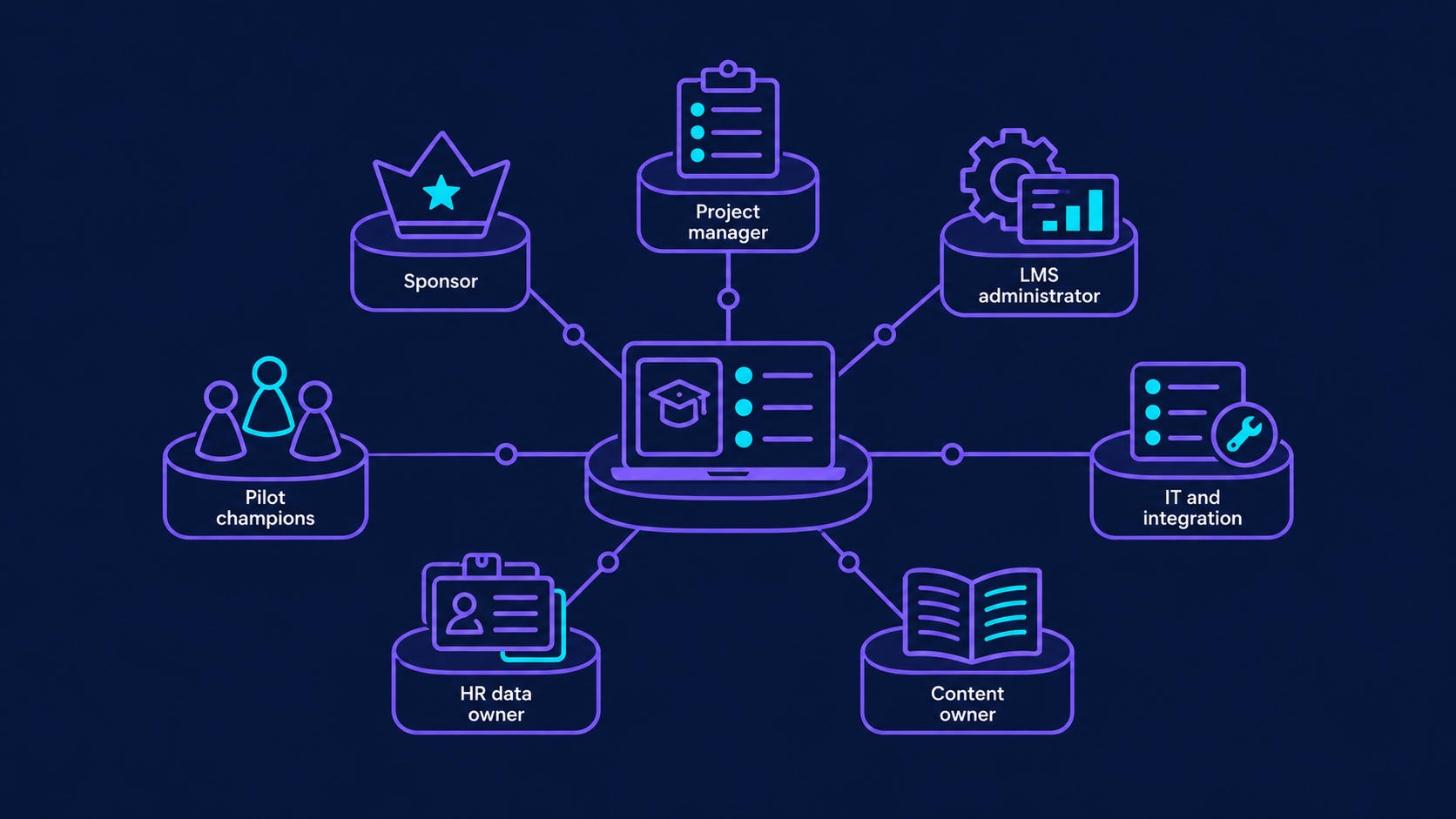
An LMS project touches HR, IT, security, learning&development (L&D), and line managers. Without a named owner in each area, decisions stall in email threads. A dedicated implementation team doesn’t have to be large, but each role needs time allocated, not just a name on a slide.
| Role | Responsibility during the LMS project |
| Executive sponsor | Owns the LMS investment, removes blockers, and approves scope changes |
| Project manager | Runs the project plan, timeline, risks, and the communication plan |
| LMS administrator | Configures roles, catalogs, and automation rules, then runs the platform after launch |
| IT and integration lead | Owns single sign-on (SSO), human resources information system (HRIS) sync, application programming interfaces (APIs), data security, and hosting decisions |
| Instructional designer or content owner | Audits training materials, plans learning paths, and validates course content |
| HR data owner | Defines the source of truth for job roles, departments, managers, and hire dates |
| Pilot champions | Test with real tasks, report friction, and help peers during the rollout |
If the project team lacks integration or platform experience, bring in an LMS implementation consultant for architecture and data decisions rather than for the whole project. A simple responsible, accountable, consulted, and informed (RACI) matrix keeps ownership clear, and external IT project management helps when no one internally can give the LMS project enough hours each week.
Done when: every role has a named person, a weekly time commitment, and a decision they own.
Step 3. Audit training content and plan the migration
Content work is the most underestimated part of the entire LMS implementation process. Teams plan to move “everything” and discover hundreds of outdated files, duplicate courses, and Sharable Content Object Reference Model (SCORM) packages that no longer launch.
- Export an inventory of current training content with owner, last update date, format, and usage.
- Sort each item into keep, rework, or retire. Low-usage and outdated items usually make up a large share of legacy libraries.
- Check standards support. SCORM covers most legacy courses. Experience API and cmi5, the ADL Initiative’s successor to SCORM, record richer learning data and work outside the browser.
- Decide what learner history you must keep: completions, certificates, scores, and expiry dates for compliance training.
- Migrate in batches and spot-check each batch against the source system.
Learner records deserve the most care. When Geniusee built an interactive e-learning platform for medical school applicants, the team moved videos, quizzes, and historical test results to the new system so students kept their progress. Losing someone’s certification history creates a compliance gap and an angry support queue in the first week.
Done when: you have a signed-off content list for release 1 and a tested migration script for learner records.
Step 4. Configure the platform and design learning paths
Configuration turns a generic platform into the LMS experience your learners and managers see every day. Keep the first release simple: every extra rule is something your LMS admin has to maintain.
- Roles and permissions: learner, manager, instructor, LMS administrator, and reporting-only users.
- Catalog structure: categories and tags that match how employees search, not how the org chart looks.
- Learning paths: role-based sequences with prerequisites, due dates, and certificates.
- Automation rules: auto-enrollment by job role or hire date, reminders, escalations to managers, and recertification cycles.
- Branding and notifications: email and in-app messages written in plain language.
- Accessibility: keyboard navigation, captions, contrast, and screen-reader support. If you serve learners in the EU, the European Accessibility Act has applied since June 2025, and conformance with Web Content Accessibility Guidelines (WCAG) 2.2 at level AA is the practical benchmark.
Design for each role separately. On the SciQuiry eLearning platform, Geniusee designed dedicated interfaces for students and admins and validated them in demos at 3 stages before handoff. Engagement mechanics such as progress markers and gamification in education work best when they support the learning path instead of competing with it.
Done when: a test learner in each role can find, start, and complete an assigned course without help.
Step 5. Integrate the LMS with HR, identity, and business systems
Integrating the LMS with your existing tools is where implementations most often run over schedule. It’s also where the platform starts saving administrative time.
- HRIS: pick one source of truth for employees, roles, managers, and departments. Sync new hires, transfers, and leavers automatically.
- Single sign-on (SSO): Security Assertion Markup Language (SAML) or OpenID Connect through your identity provider, so nobody manages separate passwords.
- CRM and customer systems: for customer or partner academies, link training status to accounts.
- Video, conferencing, and payments: for live sessions, paid courses, and subscriptions.
- Reporting and BI: export completion and assessment data to the tools leaders already read.
For xUnlocked, a video learning platform for finance teams, Geniusee implemented SSO through Auth0 and SAML, ChargeBee for subscription billing, and SSO connectivity with Cornerstone so enterprise learners can open xUnlocked videos inside the learning ecosystem their company already uses. That last integration matters: large clients rarely replace their main LMS, so content has to reach learners where they already are. Our LMS integration services page explains how we scope this work.
Done when: a new hire created in the HR system appears in the LMS with the right learning path, and signs in through SSO on day one.
Step 6. Test, pilot, and fix before the rollout
Testing should ensure your LMS handles real data and real people, not only clean demo screens.
- Functional and regression testing: enrollments, completions, certificates, and notifications for each role.
- Data validation: compare migrated learner records against the source system for a sample of users.
- Integration tests: hire, transfer, and terminate test users in the HR system and check what the LMS does.
- Load testing: simulate a compliance deadline when thousands of employees open the same course.
- Accessibility checks: automated scans plus manual keyboard and screen-reader tests.
Then run a pilot with 1–2 real cohorts for 2–4 weeks. Pick a group with a genuine deadline, such as mandatory online training, so feedback reflects actual use. Fix what the pilot reveals before you invite everyone. A structured QA and software testing process catches integration defects that users would otherwise report as “the LMS doesn’t work.”
Done when: the pilot cohort completes its assigned training, critical defects are closed, and support tickets per learner are falling.
Step 7. Launch, communicate, and support adoption
The launch is a sequence, not a date. A successful rollout usually runs in phases: an LMS rollout by department, region, or audience lets your support team handle questions without a backlog.
- Communication plan: explain what changes for each audience, why it helps them, and where to get help. Send messages from leaders and managers, not only from L&D.
- Manager enablement: before you launch your LMS to a team, show its managers how to assign courses and read team reports before their teams get access.
- First-week support: a help channel, short how-to videos, and office hours.
- 30/60/90-day reviews: check adoption, completion, and support trends, then adjust learning paths and notifications.
- Ownership: hand the platform to a named LMS administrator with a backlog of phase 2 improvements.
Post-launch work decides whether the platform stays useful. Plan for post-release support as part of the original budget instead of discovering the need after the implementation team disbands.
Done when: all target audiences have access, adoption metrics are reviewed monthly, and the LMS administrator owns the roadmap.
What is a realistic LMS implementation timeline?
A realistic LMS implementation plan depends on 3 things: the platform model, the number of integrations, and how much content and learner history you migrate. Vendor proposals often quote the configuration time only. The table below shows the planning ranges we use for scoping; your project can be shorter or longer. A successful LMS implementation plan also keeps a buffer for integrations and content reviews.
| Phase | Cloud-based LMS, light integrations | SaaS or open source with HRIS, SSO, and migration | Custom or enterprise platform |
| Goals, scope, and project plan | 1–2 weeks | 2–4 weeks | 4–8 weeks (discovery) |
| Configuration or build | 1–3 weeks | 3–6 weeks | 3–6 months |
| Integrations | 1–2 weeks | 4–8 weeks | Built in parallel with the platform |
| Content and record migration | 1–2 weeks | 3–6 weeks | 4–8 weeks |
| Testing and pilot | 1–2 weeks | 3–5 weeks | 4–6 weeks |
| Rollout and stabilization | 1–2 weeks | 2–4 weeks | 4–8 weeks |
| Typical total | 1–3 months | 4–6 months | 6–9+ months |
Phases overlap, so the total is shorter than the sum of the rows. A tight first release shortens everything. MyTutor, an online tutoring platform, had its first live version within 2 months because the scope was focused and the architecture grew later, from a monolith to microservices on AWS. A full e-learning product with native mobile apps and AI features took 9 months to reach a complete MVP.
A thorough LMS implementation plan names the factors that stretch the LMS implementation timeline:
- No agreed source of truth for employee data
- Multiple audiences with different branding, pricing, or access rules
- Large libraries of legacy SCORM packages that need retesting
- Security reviews scheduled after the build instead of during it
- New stakeholders joining halfway through and reopening scope
Common LMS implementation mistakes and how to avoid them
Most failed rollouts trace back to a short list of decisions that generic LMS best practices skip. The LMS implementation best practices below address them directly.
- Treating the vendor’s timeline as your timeline. LMS providers estimate platform setup. Your internal approvals, data cleanup, and content reviews come on top. Add them to the project plan with owners.
- Migrating every course. Moving retired content wastes migration effort and clutters search. Retire first, then migrate.
- Configuring before integrating. Learning paths built on manual user lists break the first time someone changes roles. Connect the HR system early.
- Launching to everyone at once. A big-bang LMS deployment overloads support and turns small bugs into company-wide complaints. Use the pilot and a phased rollout.
- Leaving no one to run the platform. Implementation ends, administration doesn’t. One best practice: plan LMS administrator capacity in the budget from day one.
- Measuring logins. Activity numbers look good in month 1 and say little about learning. Track completion by deadline, assessment results, and time-to-competency against the goals from Step 1.
Where does an AI-powered LMS fit in implementation?
AI adoption in training is rising fast: the same Training magazine survey shows 37% of organizations used AI in training in 2025, up from 25% a year earlier. An AI-powered LMS can recommend content, generate quiz drafts, answer learner questions, and flag learners who fall behind. Each of those features depends on clean course metadata and learner data. Teams that have been using an LMS for a while have that history; a brand-new platform doesn’t, which is why AI belongs in phase 2 for most teams, after the core platform is stable.
Start with one use case you can measure. On the medical exam-prep platform mentioned above, Geniusee added a context-aware chatbot that explains questions and navigates between lessons, plus AI-assisted feedback on practice answers. Each feature had a clear learner task behind it. Our AI for EdTech team and this overview of predictive analytics in education cover the data foundations these features need.
How Geniusee supports LMS implementation projects
Geniusee works on LMS projects at 3 levels: advising on the platform and implementation plan, integrating an existing LMS with business systems, and building custom learning platforms when off-the-shelf tools can’t support the model.
“When an LMS rollout breaks in the first week, the cause is usually enrollment data: 2 systems disagree about who works where and who reports to whom. We agree on the HR source of truth and test the SSO flow with real accounts before anyone configures a single course. It’s less visible than the interface work, and it decides whether you get a smooth implementation or a week of support tickets.”
Nazariy Hazdun, CTO at Geniusee
A few projects show how this looks in practice:
- xUnlocked: rebuilt a WordPress video learning platform on Laravel and React, added enterprise SSO, team roles, an assignment engine for courses and learning goals, and manager analytics. The platform reports 100K+ learners trained and a 93% video completion rate.
- Financial Edge Training: updated and secured WordPress and Moodle plugins, integrated an online certification process, and added reporting on learner interactions for a provider of finance training used by major investment banks.
- MyTutor: delivered a first live version in 2 months, then scaled to a microservices architecture on AWS with integrations for school infrastructure, payments, analytics, and authentication. The platform has delivered 4M+ lessons.
- Medical exam-prep platform: built web and mobile apps, migrated historical learner data, and grew from 40,000+ students in the first year to 100K+ users.
If you need LMS implementation services for one part of the project, such as choosing a platform, planning integrations, or recovering a stalled rollout, our LMS consulting services can start with a focused assessment. For broader programs, see our eLearning software development work.
Final thoughts
A good LMS implementation plan is specific about 3 things: what the first release must achieve, who owns each decision, and how learner data moves between systems. Get those right, and a successful implementation follows: configuration, testing, and the rollout move along a predictable path. Skip them, and the platform launches on time and loses users by the second month.
A well-implemented LMS becomes part of how managers run their teams. Use the 7 steps above as your LMS implementation checklist, keep the “done when” gates, and plan administration and support before launch day.
Planning a new LMS or a stalled rollout? Talk to Geniusee’s EdTech engineers about your integrations, migration, and timeline. Book an LMS implementation consultation
How long does LMS implementation take?
Most teams can implement an LMS with light integrations, usually a cloud-based LMS, in 1–3 months. Projects with HRIS sync, SSO, and learner record migration typically take 4–6 months, and custom or enterprise platforms 6–9 months or more. Integrations, content readiness, and the size of the first release drive the timeline more than platform setup does.
What are the main LMS implementation steps?
The core LMS implementation steps are: define training goals and success metrics, build the implementation team, audit and migrate content, configure the platform and learning paths, integrate HR and identity systems, test and pilot, then launch in phases with a communication plan. Each step should end with a clear exit criterion before the next one starts.
Who should be on an LMS implementation team?
At minimum, you need an executive sponsor, a project manager, an LMS administrator, an IT or integration lead, a content owner, and an HR data owner. Add pilot champions from the business. Each role needs dedicated hours, because part-time ownership is the most common reason decisions stall during implementation.
How much does LMS implementation cost?
Cost depends on the platform model, licenses or build effort, integrations, content rework, and post-launch administration. Integrations and content migration often cost more than configuration. To get a realistic figure, scope the first release, list integrations, and count the courses you plan to migrate. Our AI Estimator gives a first range for custom builds.
When should you hire an LMS implementation consultant?
Bring in an LMS implementation consultant when your team hasn’t run an LMS project before, when you need complex HRIS or SSO integrations, or when a rollout has already stalled. A consultant is most valuable during planning and architecture, where early decisions about data ownership and platform model prevent costly rework later.
Can we keep learner history when implementing a new LMS?
Yes. Completions, certificates, scores, and expiry dates can move to the new system if you map fields before migration and validate batches against the source. Keep compliance records as a priority. If some history can’t migrate cleanly, archive it in a read-only format that auditors can still access.
What should you measure after an LMS launch?
Track the goals you set before implementation: completion rates by deadline, assessment scores, time-to-competency for new hires, and manager-assigned training completed. Add operational signals such as support tickets per learner and enrollment errors. Review them at 30, 60, and 90 days, then adjust learning paths and notifications.